How Long Does My Android Phone Get Updates? Samsung, Pixel, Xiaomi & Co. Compared
How long your Android phone keeps getting updates – Samsung, Google Pixel, Xiaomi, OnePlus, Nothing and Fairphone compared, plus an instant check, the difference between OS and security updates, and what to do when support ends.
How much longer is your Android phone actually safe to use – and when is it time to move on? The answer comes down to one number: how long the manufacturer ships updates. And the spread is enormous. A current Google Pixel or Samsung flagship now gets seven years of new Android versions and security patches; a Fairphone gets eight. A cheap entry-level handset is often cut off after two. This guide shows you how long your model is covered, how to check its status in 30 seconds, what the different kinds of updates actually mean – and what to do once the support runs out.
Last updated August 2026 · the current Android version is Android 17.
Instant check: is your phone still covered?
Two glances into Settings tell you where you stand:
Is anything still arriving? Open Settings › Software update › Download and install (on Pixel: „System › Software update"). If nothing has landed for a long time, that's a warning sign.
How old is your security level? Under Settings › About phone › Software information › Android security patch level you'll find a date. If it's more than two or three months old, your device is lagging – or it isn't being served at all any more.
If that patch date is many months old and no updates arrive, you're on thin ice security-wise. How bad that really is, and what you can do about it, comes further down – first, the big picture.
Where to find the update status on your brand
The menu items are worded slightly differently on every skin. Here are the paths to the two things that matter – „is there an update?" and „how current is my security level?":
Manufacturer
Check for updates
Check security level
Samsung (One UI)
Settings › Software update › Download and install
Settings › About phone › Software information
Google Pixel
Settings › System › Software update › Security update
Settings › About phone › Android security update
Xiaomi / Redmi / POCO
Settings › About phone › HyperOS version (tap it)
Settings › About phone › Android security update
OnePlus (OxygenOS)
Settings › About device › Up to date
Settings › About device › Android version
Nothing
Settings › System › System update
Settings › About phone › Android version
Motorola
Settings › System › System updates
Settings › About phone › Android version
Paths vary slightly with the Android and skin version, but the order is similar everywhere.
The single most important value is the Android security patch level: a date such as „1 July 2026". It tells you which set of known vulnerabilities your device is protected against. If it's older than roughly three months, something is off – either you missed an update, your model has moved to a quarterly cadence, or support has ended.
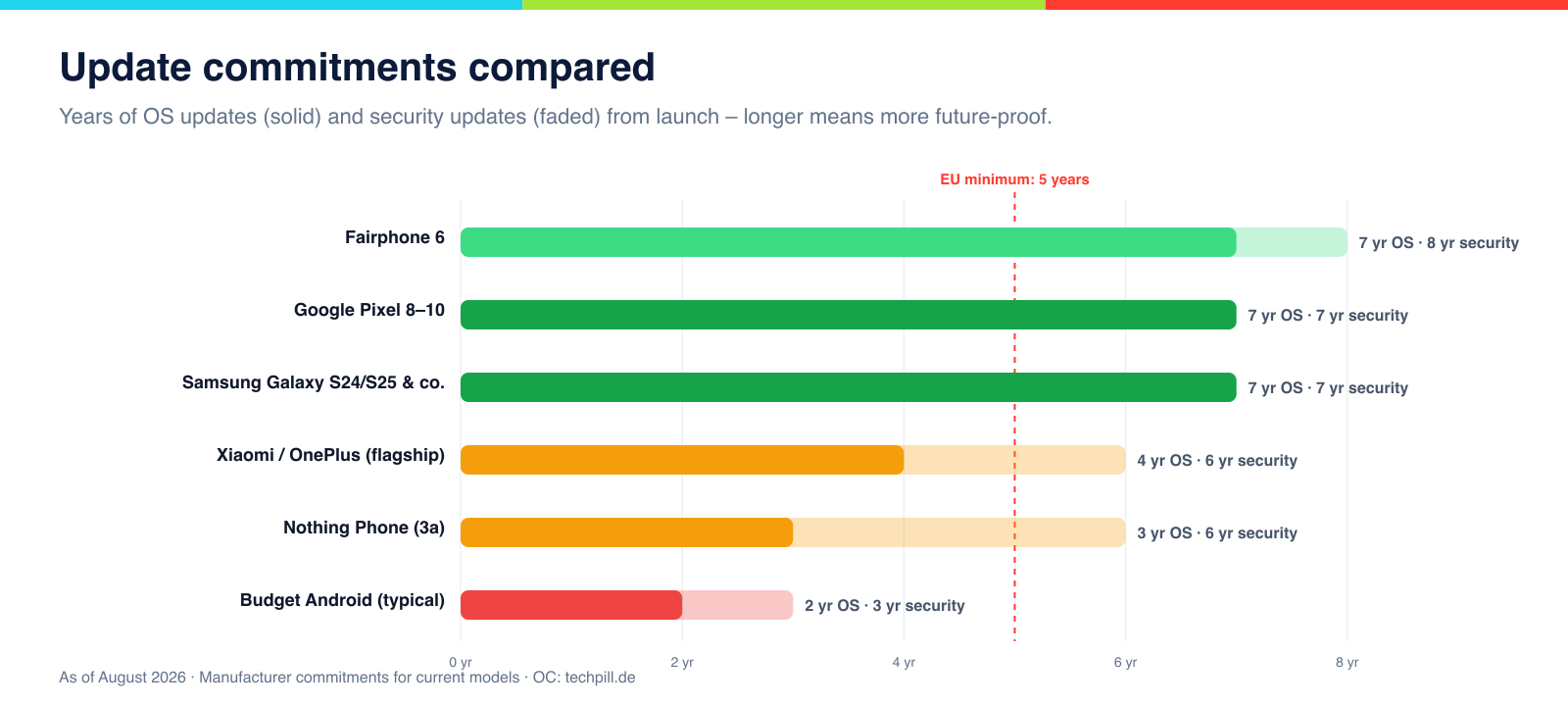
Update commitments for current models – solid bars are OS-update years, faded bars security years. The red line marks the EU minimum.
The big update table: brand by brand
How long each manufacturer covers its current models. The figures count from the model's market launch; older devices in the same line have shorter windows. Search for your phone or filter by brand and status:
26 model lines
Model
Launch
Updates
Status
Notes
Galaxy S25 · S25+ · S25 UltraSamsung
2025
7 years OS · 7 years securitySecurity until ~2032
Still gets OS updates
Full OS and security updates through roughly 2032.
Galaxy S24 · S24+ · S24 UltraSamsung
2024
7 years OS · 7 years securitySecurity until ~2031
Still gets OS updates
Samsung's first 7-year pledge — supported until around 2031.
Galaxy Z Fold 6 · Z Flip 6 (and newer)Samsung
2024
7 years OS · 7 years securitySecurity until ~2031
Still gets OS updates
Premium foldables get the same 7-year promise as the S series.
Galaxy A56 (current A series)Samsung
2025
6 years OS · 6 years securitySecurity until ~2031
Still gets OS updates
Unusually long support for a mid-ranger — close to the flagship tier.
Galaxy S23 · S23+ · S23 UltraSamsung
2023
4 years OS · 5 years securitySecurity until 2028
Still gets OS updates
Final major OS update in early 2027, security patches into 2028.
Galaxy Z Fold 5 · Z Flip 5Samsung
2023
4 years OS · 5 years securitySecurity until 2028
Still gets OS updates
One more major update expected, security patches until 2028.
Galaxy A54Samsung
2023
4 years OS · 5 years securitySecurity until 2028
Still gets OS updates
Solidly supported mid-ranger under the older policy.
Galaxy S22 · S22+ · S22 UltraSamsung
2022
4 years OS · 5 years securitySecurity until 2027
Security only
OS updates finished; final year is quarterly security patches only.
Galaxy S21 · S21+ · S21 UltraSamsung
2021
4 years OS · 5 years securitySecurity until 2026
Support ended
Dropped from the regular update programme in mid-2026 — no more patches.
Galaxy S20 series and olderSamsung
2020 and earlier
3 years OS · 4 years securitySecurity until 2024
Support ended
Support has ended — use only with precautions.
Pixel 10 · 10 ProGoogle
2025
7 years OS · 7 years securitySecurity until ~2032
Still gets OS updates
Gets new Android versions first, plus quarterly Feature Drops until ~2032.
Pixel 9 · 9 Pro · 9 Pro XLGoogle
2024
7 years OS · 7 years securitySecurity until ~2031
Still gets OS updates
Fully supported through roughly 2031.
Pixel 8 · 8 Pro · 8aGoogle
2023
7 years OS · 7 years securitySecurity until ~2030
Still gets OS updates
The first Pixel with a 7-year pledge — the turning point for Android updates.
Pixel 7 · 7 Pro · 7aGoogle
2022
3 years OS · 5 years securitySecurity until 2027
Security only
Major OS updates finished; security patches continue into 2027.
Pixel 6 · 6 Pro · 6aGoogle
2021
3 years OS · 5 years securitySecurity until 2026
Security only
Security updates run out in 2026 — time to plan a switch.
Pixel 5 and olderGoogle
2020 and earlier
3 years OS · 3 years securitySecurity until 2023
Support ended
Support has ended.
Fairphone 6Fairphone
2025
7 upgrades OS · 8 years securitySecurity until ~2033
Still gets OS updates
The longest support on the market: seven Android upgrades plus security patches into 2033.
Fairphone 5Fairphone
2023
5 upgrades OS · 8 years securitySecurity until ~2031
Still gets OS updates
Five Android upgrades, then security patches into 2031 — unusual for this class of device.
Xiaomi 15 (flagship)Xiaomi
2025
4 years OS · 6 years securitySecurity until ~2031
Still gets OS updates
HyperOS updates until ~2029, security patches beyond that.
Xiaomi 14 (flagship)Xiaomi
2024
4 years OS · 6 years securitySecurity until ~2030
Still gets OS updates
Several more years of coverage ahead.
Redmi Note (current mid-range)Xiaomi
2025
2–3 years OS · 4–5 years securitySecurity until ~2030
Still gets OS updates
Much shorter than the flagships — check the exact pledge before buying.
OnePlus 13 (flagship)OnePlus
2025
4 years OS · 6 years securitySecurity until ~2031
Still gets OS updates
OxygenOS updates until ~2029, security for longer.
OnePlus 12OnePlus
2024
4 years OS · 6 years securitySecurity until ~2030
Still gets OS updates
Solidly covered to the end of the decade.
Nothing Phone (3a)Nothing
2025
3 years OS · 6 years securitySecurity until ~2031
Still gets OS updates
Three major Android jumps, then years of security patches.
Motorola Edge (current flagship)Motorola
2025
~3 years OS · ~5 years securitySecurity until ~2030
Still gets OS updates
Varies by model — Motorola states different windows per device.
Moto G (budget line)Motorola
ongoing
1–2 years OS · 2–3 years securitySecurity until modellabhängig
Still gets OS updates
Shortest support in the field — new devices must still meet the EU minimum.
Still gets new Android versions Security updates only Support ended
Figures count from market launch, based on manufacturer commitments, as of August 2026. Regional and carrier variants may differ – when in doubt, check the manufacturer's page for your exact device.
The manufacturers in detail
Behind the bare numbers, every brand has its own update culture. A closer look:
Google Pixel sets the benchmark: from the Pixel 8 onward you get seven years of full updates, and since Google builds Android itself, new versions land here first – plus the quarterly „Feature Drops" with extra functionality. Older Pixels (6/7) still run on the shorter policy of three OS and five security years.
Samsung switched to seven years with the Galaxy S24, covering the S and Z premium lines as well as some tablets. What's impressive is how quickly Samsung now ships major versions. Older S models (S22/S23) are winding down on four OS and five security years, often on a quarterly cadence at the end. Even the mid-range A series has caught up dramatically, with up to six years.
Fairphone plays in a league of its own: the Fairphone 6 targets roughly eight years of support, combined with genuine repairability – making it the longest-lived Android device on the market.
Xiaomi (with Redmi and POCO) gives its flagships four OS and six security years via HyperOS; mid-range and budget models considerably less. Given the enormous line-up, always check the specific device.
OnePlus offers four OS and six security years on current flagships. The brand initially dismissed its rivals' long pledges as overkill, then quietly matched them.
Nothing, as a younger brand, promises three OS and six security years – solid, if not top of the class.
Motorola is the least consistent: individual Edge flagships get several years, while many Moto G budget devices get the bare minimum. Check the specific commitment particularly carefully here.
Model by model: will your phone get Android 17?
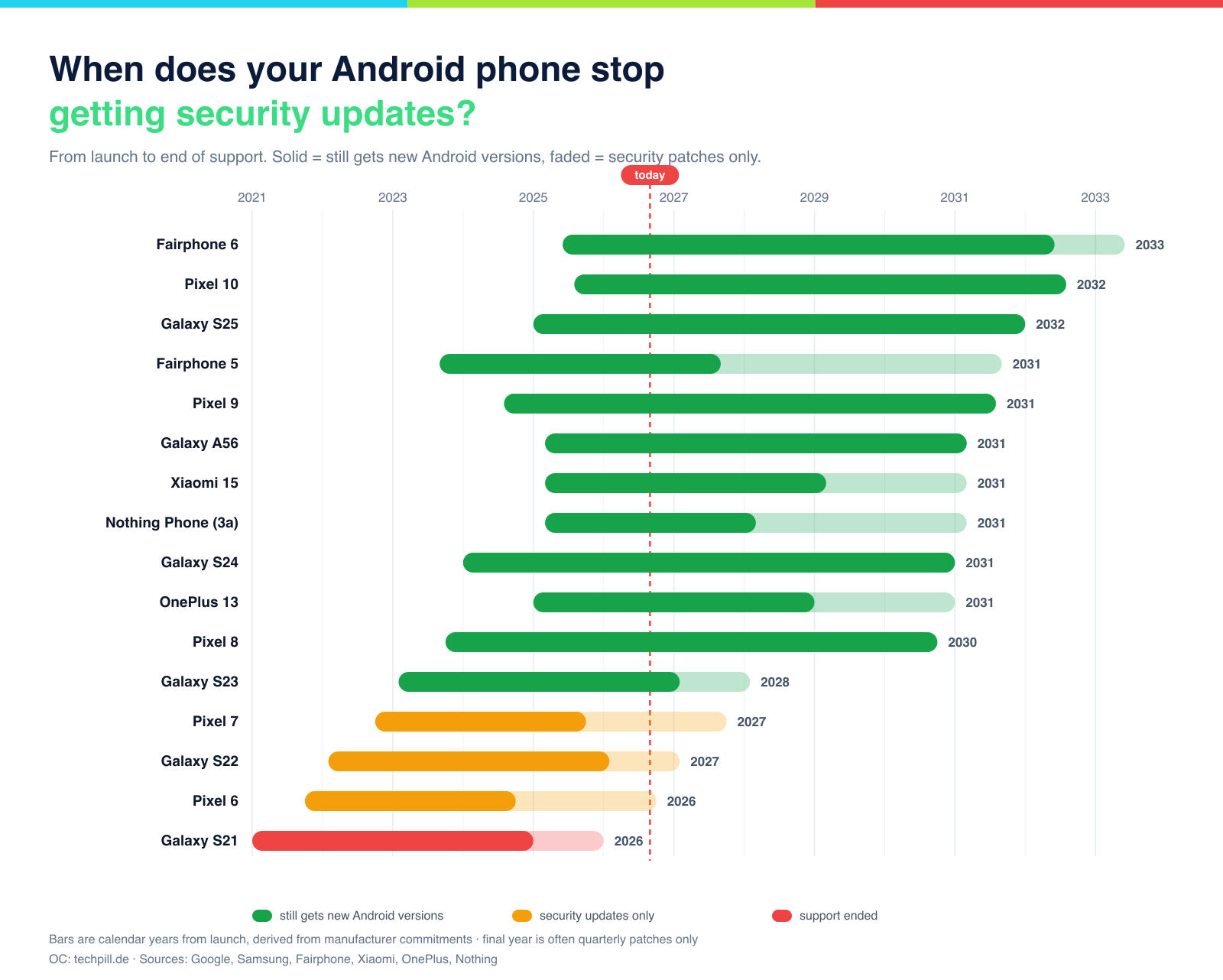
The support timeline: solid marks the years with new Android versions, faded the security-only years. The dashed line is today.
The big annual release for 2026 is Android 17. Whether your device gets it depends on the commitment above. As a rough guide: all current Pixels from the Pixel 8 on and Samsung Galaxy models from the S22 line on are included, as are the current flagships from Xiaomi, OnePlus and Nothing. Older mid-range and budget devices that are already three or four years old frequently miss out – even when they still feel fast. The rule of thumb: if your model is still inside its OS-update window in the table above, Android 17 is coming; if that window has closed, you stay on the last version you got (with luck, still with security patches).
OS update, security update, feature drop – what's the difference?
„Update" doesn't always mean the same thing. Three kinds are worth telling apart, because they matter differently:
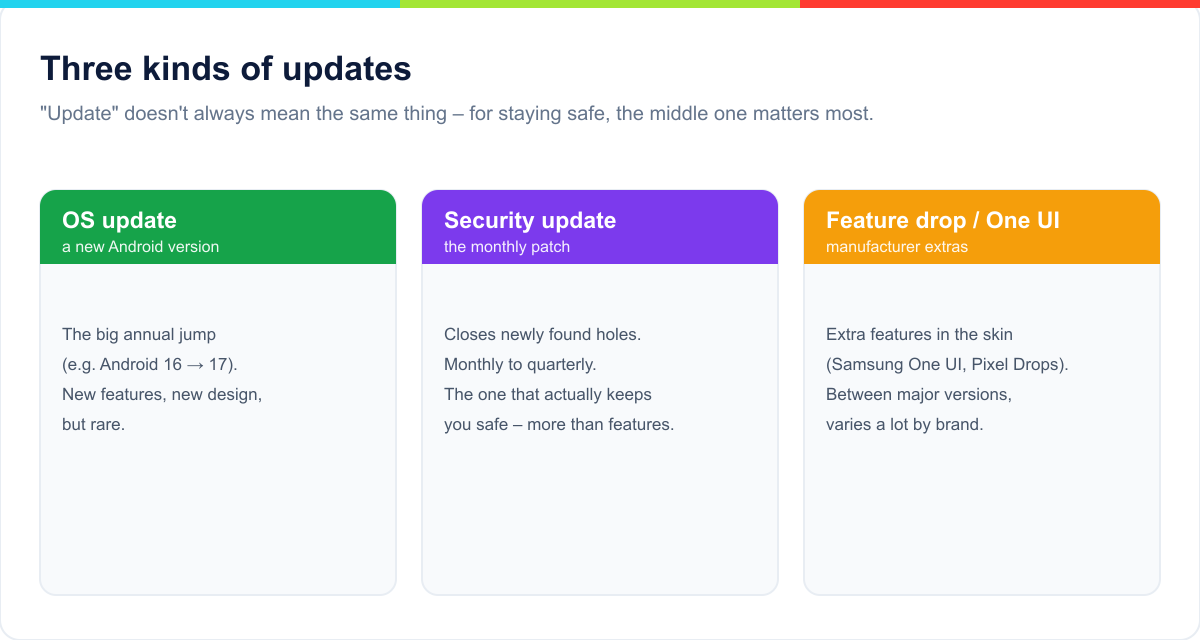
OS update, security update and feature drop compared – for safely keeping a phone, the middle one matters most.
The OS update is the big annual jump to a new Android version (say, from Android 16 to 17). It brings new features and often a new look – but it arrives rarely and matters less for security than most people assume. The security update is the monthly (later quarterly) patch that closes freshly discovered holes. That patch is what counts when you keep a phone. The feature drop, finally, is a manufacturer extra – Samsung's One UI additions or Google's Pixel Feature Drops – and varies wildly by brand.
Why one phone gets updates and another doesn't
Unlike Apple, where one company controls hardware and software, the Android world is fragmented. Several factors decide how long your device is served:
Manufacturer effort. Every Android version has to be adapted to the maker's own skin (One UI, HyperOS, OxygenOS) and tested. That costs money – expensive flagships justify more care than budget handsets.
Chip support. The chipmaker (usually Qualcomm or MediaTek) has to supply drivers for years. Google and Samsung negotiated their own arrangements here to make seven years feasible at all.
Device class. Within any brand, flagships almost always get longer support than mid-range and budget models.
Why Android updates used to be so bad – and what changed
Anyone who owned an Android phone a decade ago remembers the misery: two major updates if you were lucky, then silence. That seven years is possible today comes down to several technical shifts that largely went unnoticed:
Project Treble (from Android 8). Google separated Android proper from the manufacturer-specific hardware drivers. Previously, practically everything had to be rebuilt for each new version; since Treble, the Android layer can be swapped without touching the whole driver stack. That slashed the effort per update.
Project Mainline (from Android 10). Core system modules – for media handling or networking, say – are updated straight through the Play Store, without a full system update. That lets Google patch critical holes even when a manufacturer is slow.
Longer chip support. Google and Samsung negotiated longer driver commitments with chipmakers, primarily Qualcomm. Without those, seven years simply wouldn't be technically possible – no drivers, no Android.
Regulation and competition. EU rules and the race between Google, Samsung and Fairphone turned a cost centre into a selling point.
What this means for you: the old rule that „Android phones are dead after two years" is obsolete – but only for devices that benefit from the new pledges. A budget phone from four years ago gets none of it.
Android versions at a glance
To place how old your build is: here's how the Android timeline has run. If your device is still on Android 12 or older, you're several generations behind.
Version
Year
Where it stands
Android 17
2026
Current version
Android 16
2025
Widespread, fully supported
Android 15
2024
Still common on last year's devices
Android 14
2023
Common on older mid-rangers
Android 13
2022
Should have been superseded by now
Android 12
2021
Clearly outdated
Android 11 and older
up to 2020
Critical – usually without security patches
An old Android version isn't a disaster in itself – what counts is whether security patches still arrive.
Why your update often arrives later
A familiar Android annoyance: Google releases the new version – and nothing happens on your phone for weeks or months. The reason is the chain behind it. After Google's launch, every manufacturer first adapts the release to its own skin, matches it to the chip drivers and tests it thoroughly. Only then does distribution begin – and it runs in rollout waves, staggered by model, region and carrier, so problems surface early rather than hitting everyone at once.
So a little patience is normal, and hammering the update button won't help. Pixel devices usually get new versions first (Google builds Android itself), Samsung follows surprisingly quickly these days, other brands later. If you can't wait, Settings › Software update lets you check manually whether your wave has arrived.
Carrier phones: why updates come later
If you bought your phone on contract from a mobile operator, it may be a branded version: software customised by the carrier, with its own apps and its own update schedule. The effect is irritating – the same Android version often appears weeks earlier on unbranded devices.
You can usually spot it by pre-installed carrier apps or a code in the software version (Settings › About phone › Software information › Build number). In practice there's little you can do about it – debranding easily costs you data and warranty. The pragmatic advice: next time, buy an unbranded device if fast updates matter to you.
No update offered – here's what's usually behind it
Sometimes the manufacturer says an update is out, but your phone insists „your software is up to date". These are the most common causes:
Your rollout wave hasn't landed. By far the most frequent reason – wait a few days and check again.
Not enough free storage. Big updates need several gigabytes of headroom. Clear some space and search again.
Battery too low. Below roughly 30 per cent many devices refuse to install. Plug in and retry.
No Wi-Fi. Large updates are often downloaded over Wi-Fi only, not mobile data.
Carrier branding (see above) delays delivery.
The device is modified. An unlocked bootloader or root access often blocks official updates permanently.
Support has ended. If nothing arrives at all and the patch date is long past, your model has simply reached the end of its cycle.
Installing updates properly
Three minutes of prep keep the big jump from going wrong: make a backup (Google account backup or Samsung Smart Switch), plug the phone into power and connect to Wi-Fi. Don't switch the device off mid-install. If it feels a little sluggish or the battery drains faster for a day or two afterwards, that's normal – apps are being re-optimised in the background. If it persists, a restart or clearing individual app caches usually sorts it.
The myth: „updates slow my phone down"
Few rumours are this persistent. The facts: security updates are small and change performance essentially not at all. Major OS updates can feel sluggish on very old devices for the first few days – mostly because apps are being re-optimised in the background; after that things settle, often with battery and security improvements on top. Refusing updates for fear of „slowness" trades an imagined problem for a real one: open security holes. Holding updates back is almost always the worse choice.
The seven-year revolution: Samsung and Google
Android was long notorious for short support. That has fundamentally changed: in 2023 Google announced seven years of full updates for the Pixel 8, and Samsung followed with the Galaxy S24. With that, the two big players caught up with Apple on software support – and on the raw number of years, arguably overtook it. For you that means: a current Pixel or Samsung flagship bought today is covered into the early 2030s.
The EU minimum: five years for everyone
Since 2025 the EU has enforced a legal floor: new smartphones must receive at least five years of security updates, plus spare-part availability for years. That mainly lifts the cheap devices that used to be abandoned after a year or two. A phone newly on sale today should therefore manage at least those five years – a useful benchmark when buying.
How long does an Android phone really last?
Updates are only one side of it. Whether a device survives day-to-day also depends on the battery (noticeably weaker after three or four years), on repairability and on your own expectations. The rule of thumb: as long as security patches arrive and the battery holds up, you can keep using an Android phone without worry. Once update support falls away, the device gradually becomes a security liability – even if it runs perfectly. That's exactly why the update pledge matters as much as the spec sheet when you buy.
What really happens without security updates
„One missed update, how bad can it be?" – unfortunately, quite bad. Android security holes are documented publicly every month. The moment a hole is known, attackers know about it too; the security update closes precisely that door. Leave it open and the number of known-but-unpatched weaknesses on your device grows month by month.
Concretely: a manipulated website, a doctored file in a messenger, or a malicious app can do damage far more easily on an unpatched system – from harvesting passwords to reaching banking apps. Hence the clear recommendation: on a device without current security patches you should stop doing online banking and sensitive payments. For plain browsing, music or as a secondary device it remains usable – with the precautions below.
Android vs. iPhone: who supports longer?
The old reflex that „iPhones get updates longer" no longer holds. Apple names no fixed figure but in practice serves iPhones for roughly five to seven years. Google and Samsung now guarantee seven on their current flagships – Fairphone even more. On pure software support, the top Android devices are level with the iPhone or ahead. The difference lies in consistency across the range: with Apple practically every model gets long support, with Android only the upper tiers. For the Apple side of the picture, see our companion piece How long do iPhones get updates?.
What to do when your phone stops getting updates
A device without security patches doesn't become useless overnight – but the risk grows over time. If you don't want to replace it immediately, a few measures cut the danger considerably:
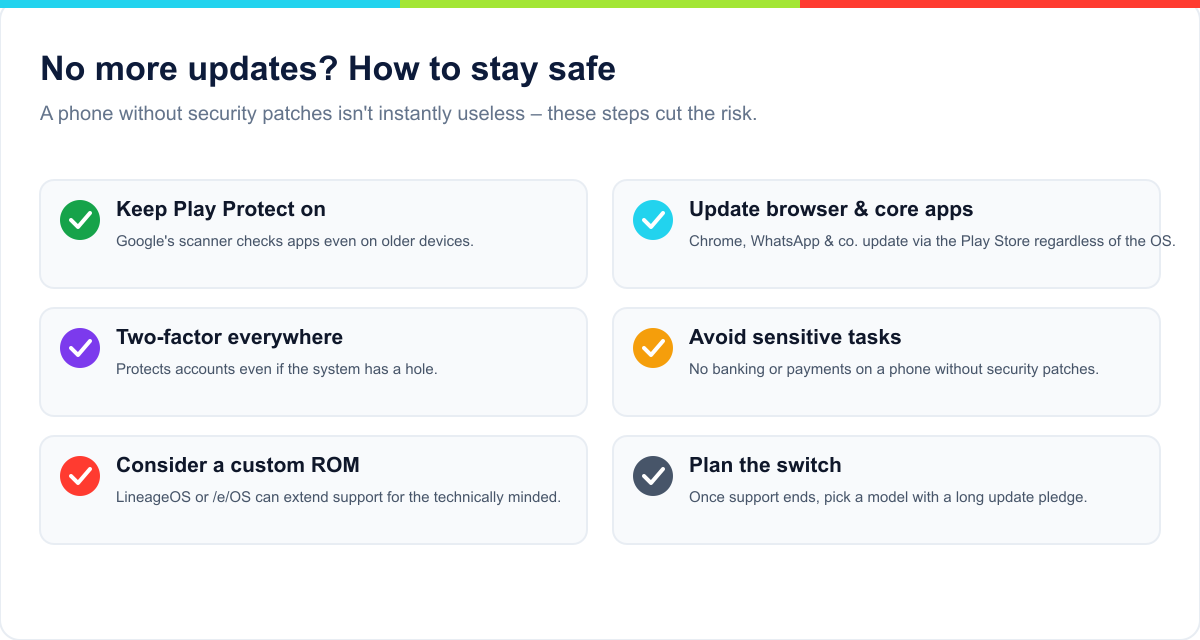
Six steps that make a phone without security patches defensible for a while longer.
Crucially, many core apps keep updating independently of the operating system – Chrome, WhatsApp and the rest get their updates through the Play Store, not the system. For the technically confident, custom ROMs are an option to extend support past the manufacturer's cut-off.
Custom ROMs: extending support yourself
When the manufacturer gives up, the device doesn't have to die. Alternative Android builds – so-called custom ROMs – are maintained by communities and keep popular models supplied with current Android versions and security patches, sometimes years after the official end.
LineageOS is the best-known: close to stock Android, broad device support, regular security updates.
/e/OS goes further and strips out Google services almost entirely – interesting if privacy matters more to you than maximum app compatibility.
To be honest about it: this isn't a casual afternoon project. You have to unlock the bootloader (which wipes all data), it can void your warranty, some banking and streaming apps refuse to run on modified systems, and in the worst case the device ends up unusable. For technically minded owners of a well-supported model it's still the most elegant way to run a solid phone safely for years more.
What about tablets, watches and headphones?
The update question isn't limited to phones. For tablets, Samsung now extends its long pledge to current Galaxy Tab models, while cheap Android tablets often get almost nothing – worth checking especially carefully. Smartwatches on Wear OS are typically served three to four years, though a watch is less exposed than a phone. With headphones and accessories it's usually just firmware improvements without security relevance. The rule holds: the more personal data a device handles and the more directly it sits on the internet, the more current updates matter.
Keep, update or replace?
Whether to hold on to your phone or move on comes down to three questions:
Are you still getting security updates? If yes, there's no reason to switch – keep using it, even without the very latest Android version.
Has support just ended, but the device is otherwise fine? Then you can run it a while longer with the precautions above – but plan the switch and avoid sensitive apps.
No support and a weak battery or other faults? Now it's worth moving to a model with a long update pledge – which then keeps you out of this topic for years.
Important: support running out on its own is no reason to panic. It's a countdown you should know about and plan for – not an off switch.
Buying used: mind the remaining support
On the used market, the remaining update window often matters more than the price. A two-year-old flagship with an original seven-year pledge still has five years ahead of it – an equally priced budget device from the same era may have none. So always count from the model's market launch and subtract the specific device's age. A well-kept older premium model is almost always the better buy on software support than a newer budget phone.
Check the update pledge before you buy
Update length is one of the most important and most overlooked points when buying new. Two devices at the same price can differ by four or five years of usable life – which usually matters more in the end than a slightly better camera. A few guidelines:
Look for the specific commitment, not just the brand. „X years of OS + Y years of security" should be stated clearly.
Count from market launch. Buying a model cheaply two years after release means two years of support are already gone.
Treat the EU standard (5 years of security) as the floor – ideally aim well above it.
What seven years of support actually mean
A long update pledge is more than a spec-sheet number – it changes the maths. A €900 phone that runs safely for seven years costs you roughly €130 a year. A €400 device that stops getting patches after three years works out at over €130 a year too – with far weaker hardware. Bought expensive is often used cheaply.
There's an environmental side as well: most of a smartphone's CO₂ footprint comes from manufacturing, not from use. Every extra year a device is safely used improves its balance noticeably. That's exactly why update duration has become a sustainability issue – and why the EU regulates it at all.
A short glossary
OS update: a jump to a new main Android version (e.g. Android 17).
Security update / patch: closes known security holes; the thing that matters for keeping a phone.
Security patch level: the date up to which your device is protected against known holes.
One UI / HyperOS / OxygenOS: the manufacturer skins layered on top of Android itself.
Feature drop: extra features between major versions (mainly Pixel and Samsung).
Custom ROM: an alternative Android build (e.g. LineageOS) that can extend support.
EOL („end of life"): the point at which a device stops receiving updates.
Frequently asked questions
How do I check how much longer my phone gets updates?
You'll find the current state under Settings › About phone › Security patch level. The guaranteed total is stated by the manufacturer for your model on their website – count from the device's market launch.
Which matters more, an OS update or a security update?
For safety, clearly the security update. New Android versions bring features, but the monthly patch is what protects you against actual attacks. A device on a current patch level but an older Android version is safer than the other way round.
Can I keep using my phone after updates end?
Yes, it keeps working. But without security patches the risk grows with every newly discovered hole. Keep apps and your browser current, avoid sensitive things like banking, and plan a switch in the medium term.
Which Android phone gets updates the longest?
Fairphone (up to around eight years), closely followed by the Google Pixel 8 and newer as well as Samsung's premium line at seven years each.
Do cheap phones get updates too?
Thanks to the EU minimum since 2025, new devices get at least five years of security updates. Older budget phones often had only one or two. Check the specific commitment.
Do updates slow my Android phone down?
As a rule, not noticeably. Security updates are small; big OS updates can feel a bit sluggish on very old devices at first, but usually bring optimisations along with them.
What is a custom ROM and is it worth it?
An alternative Android build such as LineageOS that you install yourself to keep getting updates. A good extension for technically confident users – less so for beginners, given the effort and risks.
Are seven years of updates useful if the battery gives out first?
Batteries can be replaced; software security can't be retrofitted. Long update pledges give you the freedom to genuinely keep a device – with a new battery rather than a new phone if needed.
Why does my friend already have the update and I don't?
Because manufacturers distribute in waves, staggered by model, region and sometimes carrier. That's normal. Settings › Software update lets you check whether your wave has arrived.
Will my older phone get Android 17?
Only if your model is still inside its OS-update window (see the table). If that has passed, you stay on your last version – at best still with security patches.
Does the pledge count from my purchase or from launch?
From the model's market launch. Buying later – even new – means part of the window has already elapsed. That matters especially when buying used.
Bottom line
Android has transformed its update record: from „two years and done" to seven or eight on the top models, with the EU minimum lifting the cheap end too. What counts for you is mainly this: check the specific update pledge when you buy, keep an eye on your security patch level – and once you know when support ends, you can switch in good time instead of drifting into a security hole. A well-supported phone today comfortably lasts as long as two used to.
Sources
Google: Pixel update and support policy
Samsung: Galaxy software support policy
Fairphone: software support commitment
European Commission: Ecodesign regulation for smartphones (2025)
Martin Frost ist Gründer und Herausgeber von TechPill. Er schreibt über Smartphones, Apps, digitale Dienste und verständliche Lösungen für den Technik-Alltag.
Kommentare
Noch keine Kommentare. Schreib den ersten und teile deine Erfahrung oder Frage.
The complete reference: every iPhone with its highest iOS version and a forecast of how long it keeps getting updates. iOS 27 runs from the iPhone 11 on — the XR, XS and older are out.
Google zeigt die Pixel 11-Serie und das Pixel 11 Pro Fold: Tensor G6, HiLight-LEDs, neue Kameras und ein dünneres Foldable. Preise, Termine und Details im Überblick.
Die große Referenz: Jedes iPhone mit seiner maximalen iOS-Version und einer Prognose, wie lange es Updates bekommt. iOS 26 und iOS 27 laufen ab dem iPhone 11 – XR, XS und älter sind raus.
An iPhone 17 Pro costs roughly the same everywhere — but not the same amount of work. From 3 days in Luxembourg and Switzerland, 4 in the US and 5 in Germany, to 160 in India: the global comparison in one chart.