How Long Does an iPhone Get Updates? Every Model & iOS Version
The complete reference: every iPhone with its highest iOS version and a forecast of how long it keeps getting updates. iOS 27 runs from the iPhone 11 on — the XR, XS and older are out.
Veröffentlicht 13. August 2026Von Martin FrostAktualisiert 19. September 202619 Min. Lesezeit
An iPhone typically gets major iOS updates for six to eight years — followed by another one to two years of security-only updates. The current version, iOS 26, runs on every iPhone from the iPhone 11 (2019) onward; the upcoming iOS 27 (fall 2026) supports the exact same list of devices. Models like the iPhone XR, XS, and XS Max topped out at iOS 18. In the big table further down, you'll find your model along with the highest iOS version it can run and an estimate of how much longer it will keep getting updates — plus charts, an iPhone-vs-Android comparison, a model-by-model check, and everything you need to know about security, "Batterygate," and buying used.
This guide is our continuously maintained reference: we update it with every new iOS version. Whether your iPhone still gets updates decides more than just which new features you get — above all, it decides your security, because an iPhone without security updates becomes vulnerable over time.
Instant check: How long will your iPhone be supported?
Pick your model and you'll see right away how much longer it gets updates, whether Apple Intelligence runs on it, and whether it's worth keeping, replacing the battery, or upgrading. The detailed table with every model follows below.
Supported
Your iPhone 13 is still fully covered
≈ 9 yearsexpected support · 2021–2030 · ~4 years to go
today 2026
20212030
Major iOS updatesSecurity updates
Supported iOSiOS 15 – 27+
Current iOSiOS 27
Gets iOS 27Yes
Major updates left~2 years
Apple IntelligenceNo
Repair / spare partsApproaching vintage status — parts getting scarcer
Apple Intelligence is only available on the iPhone 15 Pro and the 16 and 17 series — older models get iOS 26 but not the AI features.
Keep it, relax
Fully supported, nothing to do. Enjoy your iPhone.
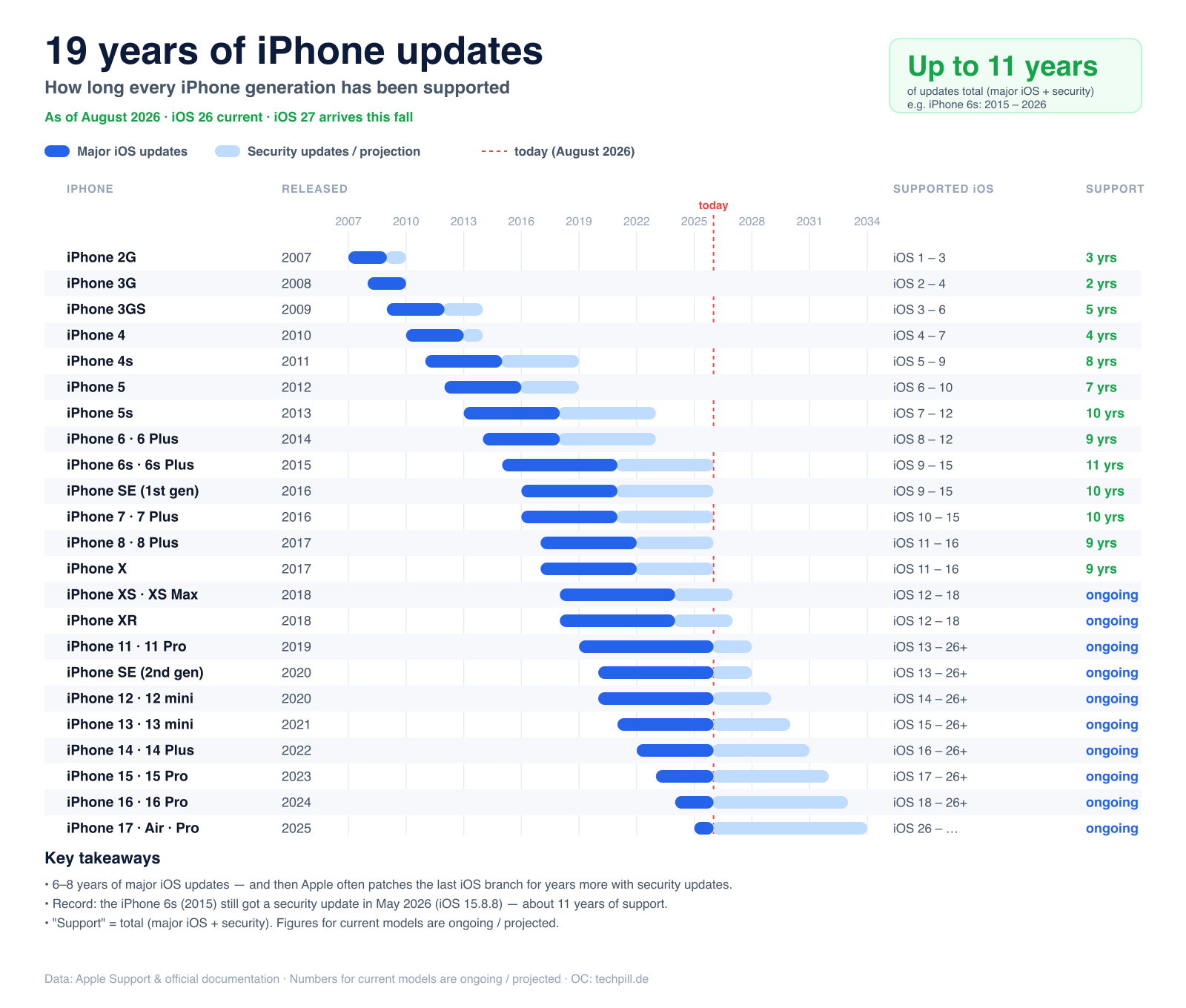
The complete iPhone update history at a glance: major iOS versions delivered (dark) plus security updates and forecast (light). The iPhone 11 holds the record, running iOS 13 through 27.
The big iPhone update table: every model and its maximum iOS version
The table is sorted by release year (newest to oldest). "Maximum iOS version" is the highest version that officially runs on the model. "Update outlook" is our estimate based on the historical support pattern — Apple itself never names firm end dates (more on that below).
All 18 model lines
iPhone model
Year
Max. iOS
Status
Update outlook
iPhone 18 Pro · 18 Pro Max · DuoShipped with iOS 27
2026
iOS 27 (current)
Supported
Updates expected until ~2033
iPhone 17eShipped with iOS 26
2026
iOS 27 (current)
Supported
Updates expected until ~2033
iPhone 17 · 17 Pro · 17 Pro Max · AirShipped with iOS 26
2025
iOS 27 (current)
Supported
Updates expected until ~2032
iPhone 16eShipped with iOS 18
2025
iOS 27 (current)
Supported
Updates expected until ~2032
iPhone 16 · 16 Plus · 16 Pro · 16 Pro MaxShipped with iOS 18
2024
iOS 27 (current)
Supported
Updates expected until ~2031
iPhone 15 · 15 Plus · 15 Pro · 15 Pro MaxShipped with iOS 17
2023
iOS 27 (current)
Supported
Updates expected until ~2030
iPhone 14 · 14 Plus · 14 Pro · 14 Pro MaxShipped with iOS 16
2022
iOS 27 (current)
Supported
Updates expected until ~2029
iPhone SE (3rd gen)Shipped with iOS 15
2022
iOS 27 (current)
Supported
Updates expected until ~2029
iPhone 13 · 13 mini · 13 Pro · 13 Pro MaxShipped with iOS 15
2021
iOS 27 (current)
Supported
Updates expected until ~2028
iPhone 12 · 12 mini · 12 Pro · 12 Pro MaxShipped with iOS 14
2020
iOS 27 (current)
Supported
Updates expected until ~2027
iPhone SE (2nd gen)Shipped with iOS 13
2020
iOS 27 (current)
Supported
Updates expected until ~2027
iPhone 11 · 11 Pro · 11 Pro MaxShipped with iOS 13
2019
iOS 27 (current)
Supported
iOS 27 is the last major update; security patches then until ~2028
iPhone XR · XS · XS MaxShipped with iOS 12
2018
iOS 18
Security only
No more major iOS; security updates expected until ~2027
iPhone X · 8 · 8 PlusShipped with iOS 11
2017
iOS 16
Support ended
Security updates until 2026 (iOS 16.7.16) – now ended
iPhone 7 · 7 Plus · SE (1st gen)Shipped with iOS 10 / 9
2016
iOS 15
Support ended
Security updates until 2026 (iOS 15.8.8) – now ended
iPhone 6s · 6s PlusShipped with iOS 9
2015
iOS 15
Support ended
Security updates until 2026 (iOS 15.8.8) – around 11 years of support, now ended
iPhone 6 · 6 Plus · 5sShipped with iOS 8 / 7
2014 / 2013
iOS 12
Support ended
Security updates until 2023 (iOS 12.5.7) – now ended
iPhone 5 · 5c and olderShipped with iOS 6 and older
up to 2013
iOS 10 and lower
Support ended
Support ended
current iOS updates security updates only support ended
As of now: iOS 27 has been the current version since 14 September 2026. We update this overview with every new iOS generation.
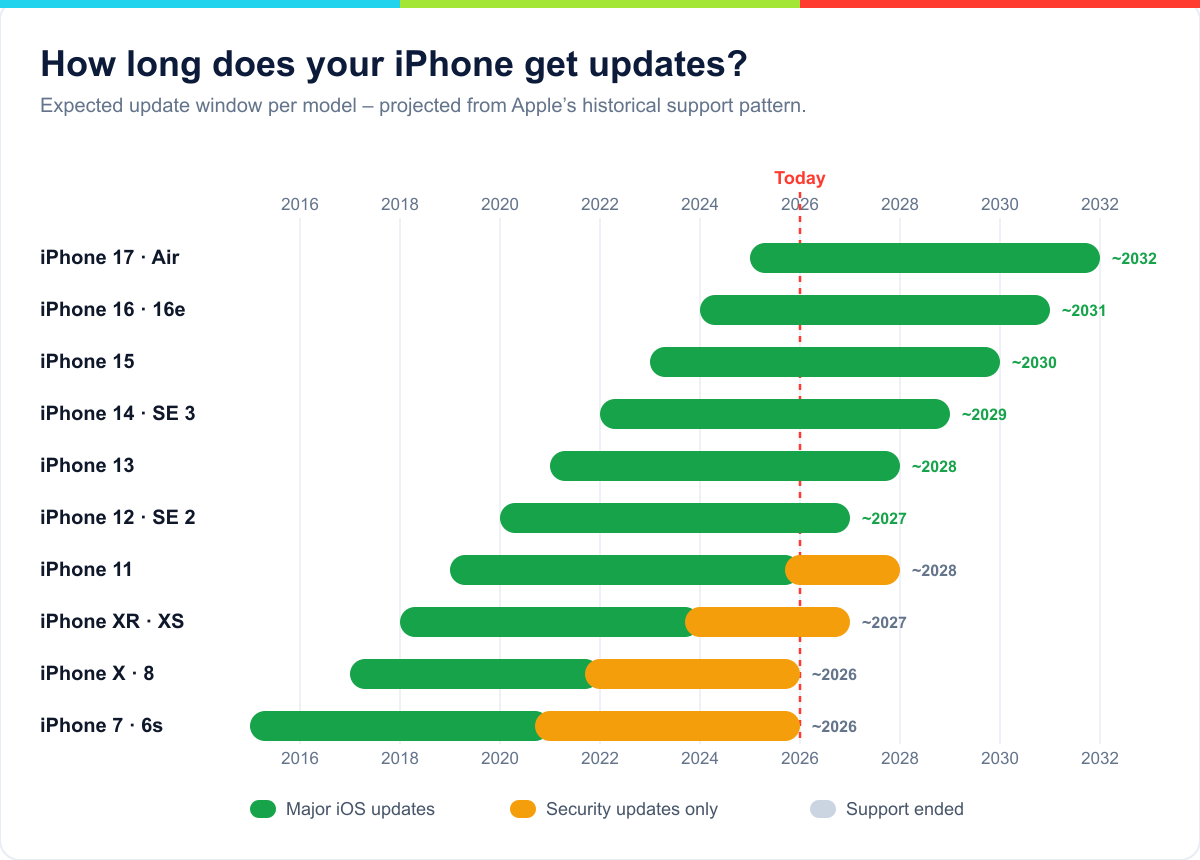
The support timeline shows at a glance how much longer each model will keep getting updates — from "ended" all the way into the 2030s.
How many major iOS updates did each iPhone get?
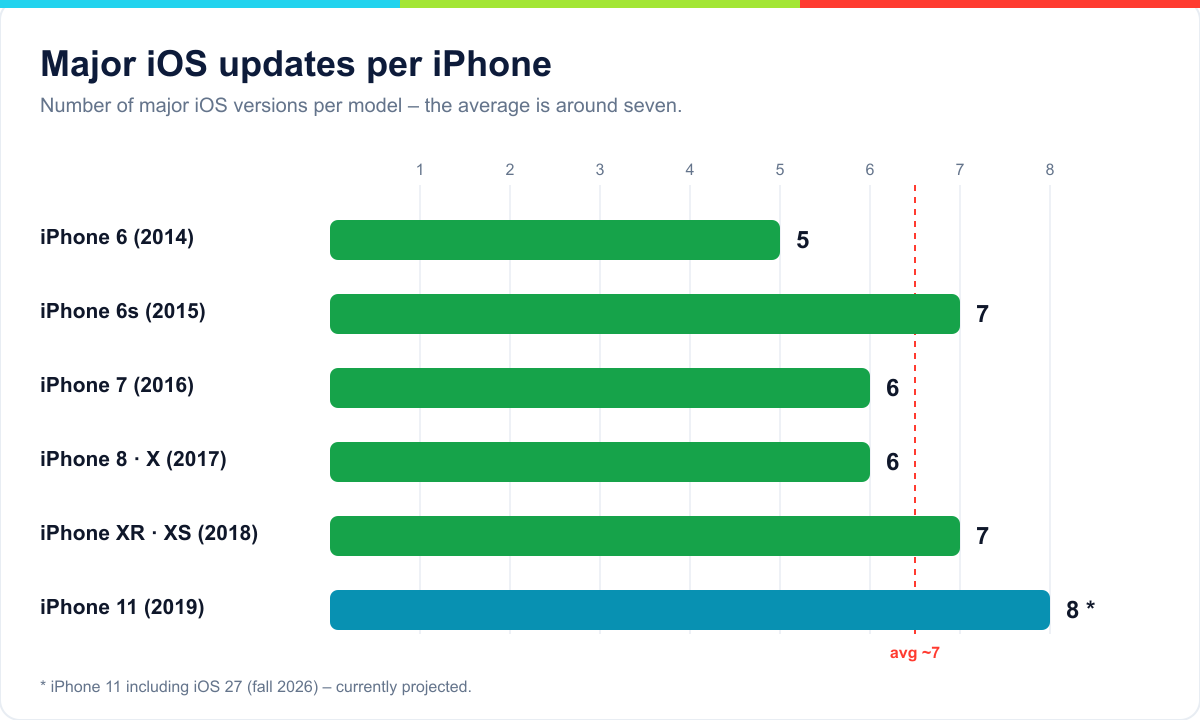
A look back shows how reliable the pattern is: almost every iPhone has received between six and eight major iOS versions. The iPhone 11 from 2019 even hits eight with iOS 27 — a record that shows Apple has, if anything, been extending update longevity lately.
Number of major iOS versions per model. The average sits around seven — Android makers have only recently begun to catch up.
For a sense of how far this has come: the iPhone 3G from 2008 got just two major updates, and the iPhone 4 got three. It wasn't until the iPhone 6s generation (2015) that the long support runs Apple now uses as a selling point settled in.
The myth that "updates make my iPhone slow"
Few topics spark hotter debate: does Apple deliberately slow down old iPhones with updates so you'll buy a new one? The honest answer is a clear yes and no — and the story behind it is worth knowing.
In 2017, it came out that Apple was throttling the performance of older iPhones (the iPhone 6, 6s, 7, and SE) with iOS 10.2.1. The reason was technically sound: an aged battery can no longer deliver short performance spikes, so the iPhone suddenly shuts itself off. The throttling prevented these crashes. The problem wasn't the technology — it was that Apple kept it quiet. People assumed their iPhone was simply "too old" and, in some cases, bought a new one when a battery swap would have solved the problem.
The outcry was enormous — "Batterygate." The fallout:
France's competition authority imposed a 25 million euro fine (2020) because Apple hadn't been transparent about the throttling.
In the US, Apple agreed to a settlement of roughly 500 million US dollars with affected users.
Apple apologized, cut the price of battery replacements, and, with iOS 11.3, added the "Battery Health" display — including a switch to turn the throttling off yourself.
That said: new iOS versions are optimized for the latest iPhones. On a very old model, the newest iOS can feel sluggish, because animations and features are built for faster chips. Installing a major update on an aging device shortly before its support ends is therefore a judgment call — security updates, on the other hand, you should always take.
Which iPhones get iOS 27?
iOS 27 (released on 14 September 2026) requires at least the A13 Bionic chip, just as iOS 26 did. That means every model from the iPhone 11 onward is supported, as well as the 2nd- and 3rd-generation iPhone SE. For the first time in years, iOS 27 drops no additional model — the device list stays identical to iOS 26.
That marks a turning point: the iPhone XR, XS, and XS Max (all with the 2018 A12 chip) topped out at iOS 18. They keep working, but they no longer get new features.
Why does one iPhone get an update and another doesn't?
Apple mainly goes by two components: the chip and the memory. New iOS features — especially the AI ones — need enough processing power and RAM, otherwise the operating system would stutter or drain the battery on old devices. The current cutoff runs at the A13 chip in the iPhone 11: it has the necessary performance and 4 GB of RAM, whereas the older A12 in the iPhone XS/XR no longer has enough to the degree required.
That's why models usually fall out of support together with their chip generation — not one at a time. So if you want to know how future-proof an iPhone is, look less at the model year than at the chip generation: the newer the A-chip, the longer the update support you can expect. Buying an iPhone with a brand-new chip at the start of its cycle therefore gives you the longest update future.
How long does Apple really support an iPhone?
Unlike Google with its Pixel phones, Apple gives no official support pledge in years. In practice, though, the rhythm is easy to read:
Major iOS updates: usually six to eight years. The iPhone 6s from 2015 got seven major versions (iOS 9 through 15), and the iPhone 11 from 2019 got eight (iOS 13 through 27).
Security updates: after the last major iOS release, Apple keeps delivering important security fixes for older models for another one to two years — sometimes even for the second-to-last iOS generation.
Bottom line, an iPhone stays safe to use for a good eight to ten years — considerably longer than most Android devices, even though Apple doesn't guarantee the timeframe. If anything, Apple has extended support in recent years: the A13 chip in the iPhone 11 is now being maintained for over eight years.
iPhone vs. Android: who delivers updates longer?
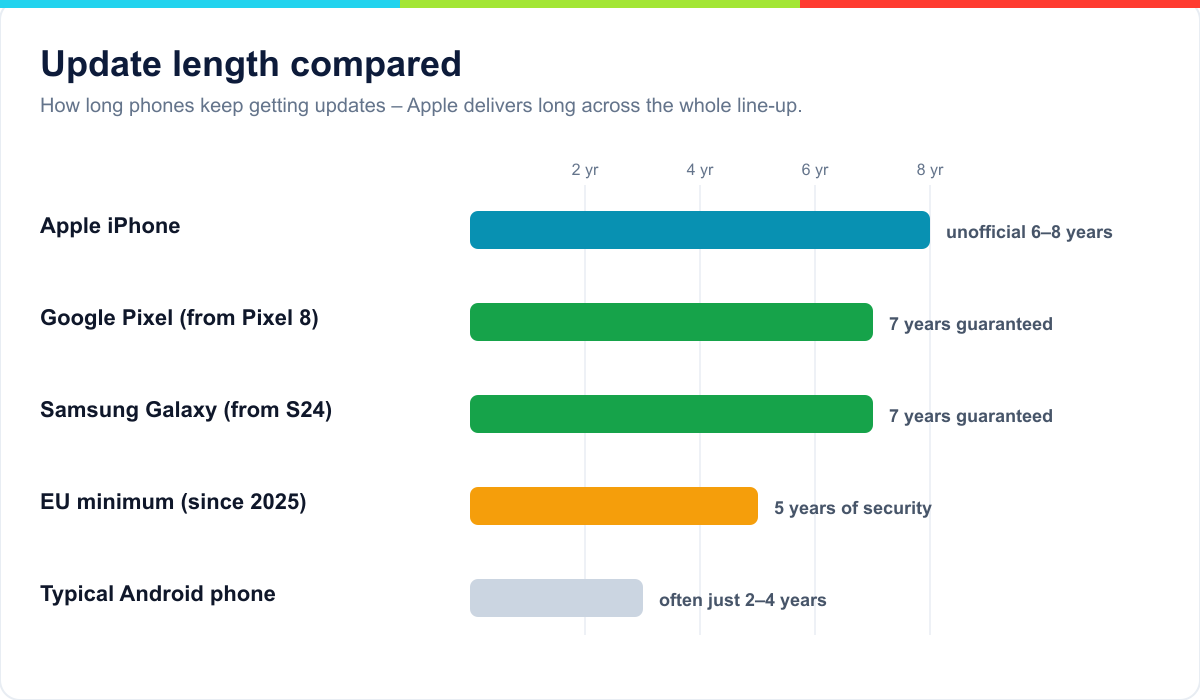
For a long time, Apple was unrivaled on update longevity. That has changed: for the Pixel 8 and newer (2023 on), Google promises a full seven years of operating-system and security updates, and Samsung matched it with the Galaxy S24 lineup (2024 on). The big difference: these makers guarantee the period in writing, while Apple only delivers it in practice.
Apple delivers six to eight years unofficially. Google and Samsung guarantee seven years for their flagships — the rest of the Android market often falls well short of that.
Important for every smartphone in the EU: since June 20, 2025, the EU Ecodesign Regulation has required at least five years of security updates after a phone stops being sold. That's a floor — Apple, Google, and Samsung all sit clearly above it with their current devices. On cheap Android phones from unknown brands, though, update support often remains the weak spot. Another Apple advantage: the company delivers updates to all supported models at the same time, whereas many Android updates spend months passing through manufacturers' hands.
Major iOS update, security update, Apple Intelligence — what's the difference?
When it comes to "updates," several things often get mixed up:
Major iOS version (e.g., iOS 26 → 27): once a year, brings new features and a new design. Only for supported models.
Point update (e.g., iOS 26.1, 26.2): spread across the year, contains bug fixes, smaller features, and — most importantly — security patches.
Rapid Security Response: small emergency patches that Apple ships between updates to close urgent holes immediately.
Security back-delivery: for models that no longer get a major iOS release, Apple publishes targeted patches against actively exploited security vulnerabilities.
For your security, it's mainly the last three categories that count. As long as your iPhone gets point or security updates, it's protected — even if it no longer gets the newest major iOS version.
Security in detail: what really happens without updates
"I have nothing to hide" is a fallacy when it comes to iPhone security. An iPhone without updates isn't hacked instantly — but every known hole that Apple no longer closes stays open forever. Attackers know this and specifically hunt for old devices.
Just how serious that can be is shown by the spyware Pegasus from the company NSO Group: through a so-called zero-click vulnerability in the iMessage service (codenamed "FORCEDENTRY"), iPhones could be completely taken over without the victim tapping anything at all — a single manipulated message was enough. The targets were mostly journalists and activists. Apple closed the hole with an update and, with iOS 16, introduced Lockdown Mode, which protects especially at-risk users. These are exactly the kind of patches that an unsupported iPhone eventually stops receiving.
For ordinary users, the everyday risk is lower than for a specifically targeted activist — but it's real: phishing pages, malicious web content, and infected attachments often exploit precisely the holes that would long since have been patched. Here's how to minimize the risk on an older iPhone:
Install every available update as long as your model still gets them.
Turn on two-factor authentication everywhere and use a password manager.
On very old devices, avoid banking, payment, and government apps.
Be extra careful with links in emails and messages from people you don't know.
Software support isn't the same as repair support: "vintage" and "obsolete"
One thing that gets constantly confused: iOS updates and hardware repairs are two different matters. Even if your iPhone still gets updates, Apple can classify parts availability separately:
Vintage: a product is considered "vintage" once Apple has stopped selling it for five to seven years. Repairs and parts are then available only as long as parts are in stock.
Obsolete: after more than seven years, a product becomes "obsolete." Apple and authorized shops then no longer offer hardware service and can't order parts anymore.
What this means for you: an iPhone can still be perfectly supported on the software side while a display or battery replacement at Apple is already getting difficult — or, the other way around, an iPhone without iOS updates can still be repaired without a hitch. So when buying used, it pays to look at both timelines. Independent shops and third-party parts can often still repair an obsolete device, though without Apple's warranty.
iOS version history at a glance
To help place which major update brought what — and which models it still runs on:
More customization, redesigned Control Center, RCS messaging
iOS 26
2025
"Liquid Glass" design, Apple Intelligence greatly expanded
iOS 27
2026
Available since 14 September 2026 (same device list as iOS 26)
There's no skipped version between iOS 18 and iOS 26 — Apple switched the numbering to the year in 2025.
Model by model: should I keep my iPhone?
The table tells you the "until when"; here comes the "what that means for me." Through the still-relevant models, one by one:
iPhone 17 / Air (2025): Newest flagship, full Apple Intelligence, updates well into the 2030s. Clearly a keeper.
iPhone 16 / 16e (2024/2025): Thoroughly current, AI features included. No reason to switch — it'll last many years.
iPhone 15 (2023): Fully supported. Only the 15 Pro handles Apple Intelligence; the regular 15 doesn't. For most people, still more than enough.
iPhone 14 (2022): Keeps getting every iOS release, but no AI features. A solid device for the next few years — keep it as long as it works for you.
iPhone 13 (2021): Still a very good iPhone with full update coverage until around 2028. The classic keeper — a battery swap makes it feel new again.
iPhone 12 (2020): Runs the current release, but is nearing the end of major updates (around 2027). Keep it, yes, but start thinking about a switch when the battery next starts to weaken.
iPhone SE 2 / SE 3 (2020/2022): Affordable, compact devices with surprisingly long support thanks to their modern chips. Ideal as a second or entry-level iPhone.
iPhone 11 (2019): Received its last major update with iOS 27; security patches follow. Still fully up to everyday tasks — but the right time to start planning a switch.
iPhone XR / XS and older: No new iOS. For security-critical use, you should switch in the medium term.
As a rule of thumb: up to and including the iPhone 13, keeping it almost always makes sense (with a new battery if needed). From the iPhone 11 on down, switching increasingly becomes a security question.
Decision guide: keep, update, or switch?
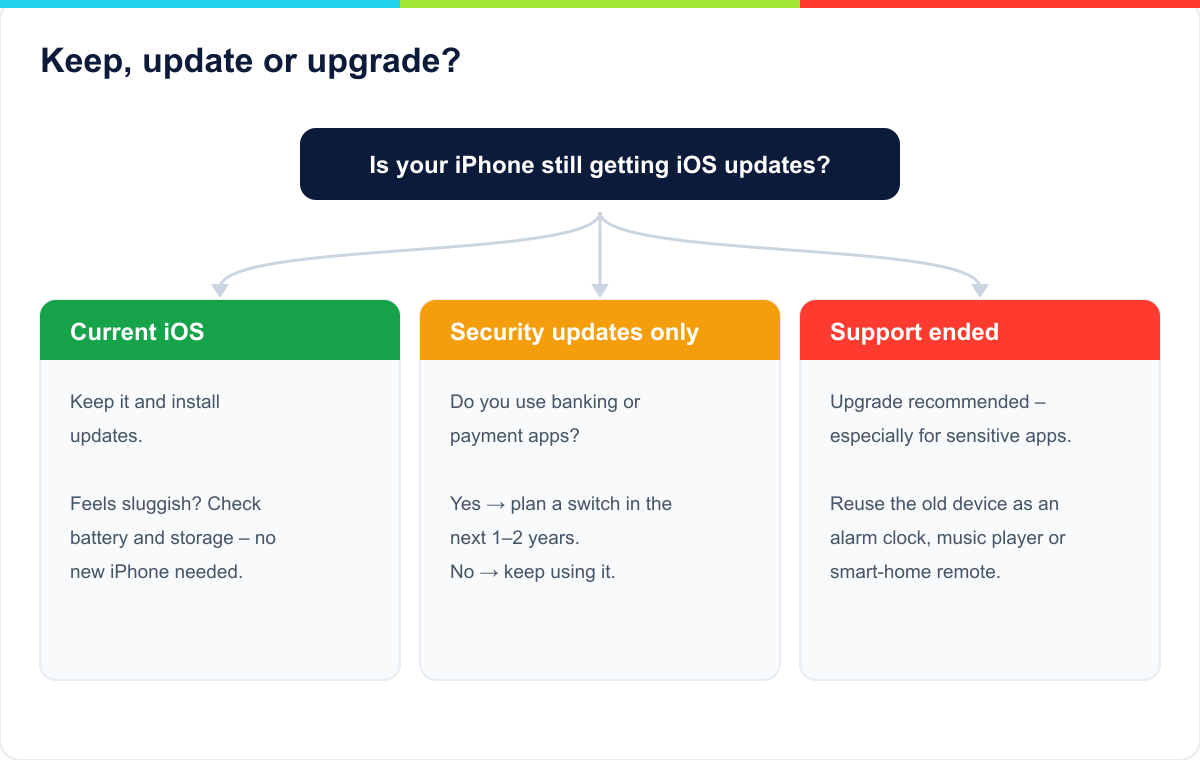
Whether you keep your iPhone, just update it, or replace it comes down to three questions: Does it still get updates? Does it run smoothly? Do you use sensitive apps? This chart walks you to a decision in a few steps.
Three questions to the right decision — from "keep it, no worries" to "plan a switch."
If a new purchase is on the horizon, our comparison of the iPhone 17 vs. iPhone 17e helps you decide between the flagship and the cheaper entry point. For long-term update security, the rule holds: the newer the chip generation, the better.
What to do when your iPhone no longer gets updates
An iPhone without security updates isn't instantly useless, but it gets riskier every month — especially for online banking, email, and passwords. Here's a sensible way to proceed:
Check your iOS version: under Settings > General > About and Settings > General > Software Update.
Install the last available update: many older iPhones run on outdated versions for no reason. If there's too little free space to do it, our guide on the topic iPhone storage full will help.
Reduce the risk: on very old devices, stop using sensitive apps (banking, payments) and turn on two-factor authentication everywhere.
Give the device a second job: an old iPhone still works as an alarm clock, music player, dashcam, baby monitor, smart-home controller, or a camera for the kids' room — with no sensitive data on it.
Plan the switch: a still-supported used model (say an iPhone 12 or 13) is often the cheapest way to get many more years of security.
How to extend your iPhone's useful life
Between "still gets updates" and "still a joy to use" lies plenty that's in your own hands. With these habits, your iPhone lasts noticeably longer:
Take care of the battery: leave "Optimized Charging" on and avoid constant heat. Once the maximum capacity drops below 80%, a battery swap is the cheapest way to rejuvenate it.
Keep storage free: a full iPhone gets slow and can't install updates. Keep a few gigabytes free.
Install updates promptly: security and point updates in particular close specific holes — putting them off gains you nothing.
Restart regularly: a reboot every few days clears out the memory and helps prevent stutters.
Make backups: a current iCloud or computer backup frees you from depending on the device — and makes the eventual move to a new iPhone stress-free.
Used-buying checklist: buy future-proof
A used iPhone is the cheapest way to get long update security — if you watch the right points:
Update years left: get at least an iPhone 12 or 13 so there are still several years of iOS updates in it. Older models are cheaper but closer to the end of support.
Activation Lock: the seller must have fully reset the iPhone and removed it from "Find My." A device tied to someone else's Apple ID is useless.
Battery health: check the maximum capacity under Settings > Battery. Below 85%, factor in a battery swap.
Vintage status: check whether Apple already lists the model as "vintage" or "obsolete" — that decides future repairs.
IMEI check: get the serial number and verify that the device isn't reported as stolen or blocked.
A short glossary: the key terms
iOS: The iPhone's operating system. Each major version comes out once a year.
Security update: an update that closes security holes — also for models without a new major iOS release.
Rapid Security Response: a small emergency patch between the regular updates.
Apple Intelligence: Apple's AI features, available only from the iPhone 15 Pro or iPhone 16/17 on.
Vintage / Obsolete: Apple's classification for repair support (5–7 years and over 7 years after a product stops being sold).
Activation Lock: ties the iPhone to an Apple ID and protects it against use by others — important when buying used.
Lockdown Mode: extra protection against targeted attacks, available from iOS 16.
Keep or upgrade? Recommendation by model
Summed up for quick orientation:
iPhone 13, 14, 15, 16, 17: Keep them, no worries. These models still get many years of updates.
iPhone 11, 12, SE (2020/2022): Still fully supported, but the oldest among them are nearing the end of major updates. No urgent action needed — just keep them in mind for your next purchase.
iPhone XR, XS, XS Max: Solid everyday devices, but without new iOS features. For security-critical use, plan a switch in the medium term.
iPhone X, 8, and older: Update support has ended — switching is worth it, especially if you use the device for banking or purchases.
Frequently asked questions
How much longer does the iPhone 11 get updates?
The iPhone 11 has likely received its last major iOS update with iOS 27. After that, expect roughly one to two more years of security updates — so, broadly, until 2028.
How long do the iPhone 12 and 13 get updates?
Both are fully supported and run iOS 27. Based on the historical pattern, major updates are realistic for the iPhone 12 until about 2027 and for the iPhone 13 until around 2028, plus security updates afterward.
Does the iPhone XR or XS still get iOS 27?
No. The iPhone XR, XS, and XS Max topped out at iOS 18 and don't get iOS 26. They do still receive occasional security updates for now.
Is my old iPhone without updates still safe?
As long as Apple delivers security updates, yes. Once those stop too, the risk rises over time. On such devices, avoid sensitive apps where you can, and switch to a supported model in the medium term.
Does Apple deliberately slow old iPhones down with updates?
Not the processor. It is documented, though, that in 2017 Apple throttled devices with aged batteries without explaining it — the "Batterygate" scandal. Today you can see this in Battery Health, and a battery swap usually restores the performance.
Why is there no iOS 19 through 25?
Apple switched the numbering to the year in 2025. iOS 18 (2024) was followed directly by iOS 26 (for 2025/2026). Versions 19 through 25 were skipped — the same goes for iPadOS, macOS, and watchOS.
How do I see which iOS version I have?
Under Settings > General > About you'll find your current iOS version. Whether an update is available shows under Settings > General > Software Update.
Do I have to install every iOS update?
With major versions, you can wait a bit until the first bugs are fixed. Security and point updates, on the other hand, you should install promptly — they close specific holes.
What is Apple Intelligence, and which iPhone do I need for it?
Apple Intelligence bundles iOS's AI features. For it, you need at least an iPhone 15 Pro or a model from the iPhone 16 or iPhone 17 lineup. Older models run iOS 26 without these AI features.
When is iOS 27 coming?
iOS 27 will, as tradition has it, be released in September 2026 alongside the new iPhones. The device list matches that of iOS 26 — every iPhone from the iPhone 11 onward is supported.
How long are there security updates after the last major iOS release?
Usually one to two years. Apple keeps publishing patches for the previous iOS generation against critical, actively exploited security vulnerabilities.
Does Android get updates for as long as the iPhone?
For the flagships, yes, now: Google Pixel (from the Pixel 8) and Samsung Galaxy (from the S24) offer seven years of updates. The bulk of the Android market falls well short of that, though, while Apple supports its entire model range for a long time.
What does "vintage" or "obsolete" mean for my iPhone?
That concerns hardware repair, not iOS updates. "Vintage" means the model was last sold five to seven years ago (parts available only in limited supply). "Obsolete" means more than seven years — at which point there's no more Apple hardware service.
Should I install the iOS beta?
On your main device, better not. Betas bring new features earlier, but they're often unstable and can interfere with battery life and apps. If at all, use them only on a secondary device.
Is a used iPhone XR or XS still worth it?
For simple tasks, yes; for long-term use, not really: without new iOS versions and with security updates set to end before long, a used iPhone 12 or 13 is the more future-proof choice.
Can I still put an old iPhone without updates to good use?
Yes. As an alarm clock, music player, smart-home remote, dashcam, or second camera, it keeps doing good service — ideally without banking, payment, or other sensitive apps.
Conclusion
iPhones are among the longest update-supported smartphones there are: six to eight years of major iOS updates plus one to two years of security updates. Right now, Apple draws the line at the iPhone 11 — everything from 2019 on runs iOS 27, while the iPhone XR/XS and older don't. Android has caught up with its flagships, but across the whole range, Apple stays ahead.
Use the table and charts above to place your model. What matters is less the newest feature than security: as long as your iPhone gets security updates, it's in good shape — and a battery swap often does more than a new purchase. We keep this overview current with every new iOS version.
Martin Frost ist Gründer und Herausgeber von TechPill. Er schreibt über Smartphones, Apps, digitale Dienste und verständliche Lösungen für den Technik-Alltag.
Kommentare
Noch keine Kommentare. Schreib den ersten und teile deine Erfahrung oder Frage.
How long your Android phone keeps getting updates – Samsung, Google Pixel, Xiaomi, OnePlus, Nothing and Fairphone compared, plus an instant check, the difference between OS and security updates, and what to do when support ends.
Die große Referenz: Jedes iPhone mit seiner maximalen iOS-Version und einer Prognose, wie lange es Updates bekommt. iOS 26 und iOS 27 laufen ab dem iPhone 11 – XR, XS und älter sind raus.
An iPhone 17 Pro costs roughly the same everywhere — but not the same amount of work. From 3 days in Luxembourg and Switzerland, 4 in the US and 5 in Germany, to 160 in India: the global comparison in one chart.
iPhone-Update hängt bei „Aktualisierung angefordert“, „Update vorbereiten“ oder am Apple-Logo? So löschst du fehlerhafte Updates, schaffst Speicherplatz und rettest das iPhone per Mac oder PC.
Datenanalyse aller iPhone-Marktstartpreise seit 2007. Nominal plus 138 Prozent, inflationsbereinigt nur plus 65 – und seit 2020 wird der Einstieg real sogar günstiger. Pro Gigabyte kostet ein iPhone heute 93 Prozent weniger als 2007.
Willst du einem Freund helfen, sein verschwundenes Handy zu finden? Du brauchst einen Aktivitätstracker, ein Maßband oder eine Lupe? Dein iPhone bietet dir Dutzende...